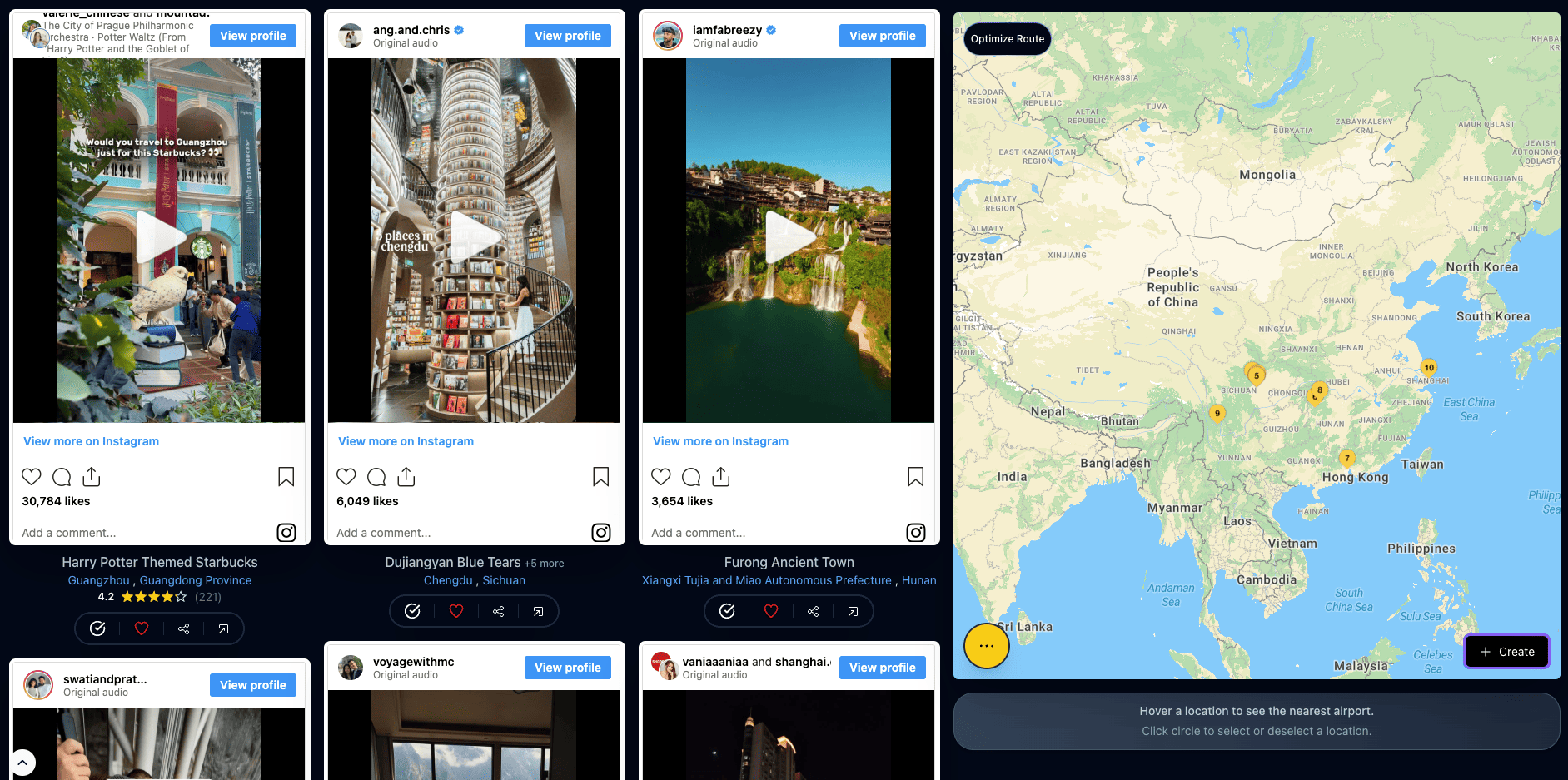
Short answer: yes. The app is Map Your Voyage. You watch a feed of breathtaking, hand-curated Instagram travel reels for a country's best spots, tap to select the ones you like, and every reel you pick instantly drops its real, human-verified location onto an interactive map beside the feed. When your shortlist is ready, you click Create and it builds a day-by-day itinerary that covers all of them.
That is the part nothing else quite does: you are shortlisting places by watching real video of them — not typing names into a planner, not asking a chatbot to guess, not scrolling a saved folder you will never reopen. And it is not limited to reels. You can also add any spot by Google search, or by pasting a YouTube link or a travel blog-post link — all onto the same map. This guide walks through exactly how it works, why watching beats reading a list, and how to go from a feed of reels to a trip on the calendar.
Want to try it right now? Open the planner, watch a few reels, tap the ones you love, and watch them land on the map. No Instagram login required — and it is free.
Watch reels & plan a trip →The Short Answer
If you only read one section, this is it. The app that lets you watch Instagram reels and select the ones you like to plan a trip is Map Your Voyage, and the whole experience is four moves:
- Watch curated travel reels for a country's top spots.
- Select the ones you like by tapping a circle under each reel.
- See each pick's verified location appear on the interactive map.
- Create a day-by-day itinerary from your whole shortlist in one click.
Everything below is detail on those four steps — plus the extra ways to add places (Google search, YouTube links, blog posts) and the reasons this approach plans a trip that actually feels like yours.
How Do You Plan a Trip by Watching Reels?
In short: you watch curated reels, tap the ones you like so their locations drop onto a map, and click Create to turn the shortlist into a plan. Here is each step in detail.
1. Open the planner and pick a country
Open the travel itinerary planner and it lands on a feed of curated reels for a top country. A dropdown lets you switch to any of 250+ countries — so whether you're dreaming about Japan, Italy or Indonesia, you go straight to footage of its best places. Prefer to browse first? Start from the destinations grid and open any country.
2. Watch the curated reels
Scroll a feed of breathtaking Instagram reels, videos and photos, hand-picked for the top tourist spots of that country and the cities within it. This is the fun part — you're not reading descriptions, you're watching the beach, the alley, the viewpoint, the restaurant. Your gut tells you in two seconds whether a place is a “yes.”
3. Select the ones you like
When a reel makes you say “I have to go there,” tap the circle icon beneath it. Because every curated reel carries a human-verified geolocation, that exact place immediately drops onto the interactive map on the right. Keep watching and selecting, and your shortlist quietly builds itself into a map of your trip — no typing, no copy-pasting addresses, no guessing where a clip was filmed.
4. Add any extra places (optional)
Already know a spot that isn't in the feed? Search Google's autocomplete right in the bar and add it. Got a brilliant YouTube vlog or a detailed travel blog post? Paste the link and its locations are pulled onto the same map. (More on this under adding your own places.)
5. Click Create to build the itinerary
When your shortlist looks right, hit Create. Map Your Voyage takes every location you selected and sequences them into a day-by-day, hour-by-hour itinerary that's efficient to actually travel — and you can fine-tune it by drag and drop afterwards.
Why Is Picking Places From Video Better Than a List?
Because you judge the real place instead of a name on a list, and your own taste does the filtering. Most trip planners start with a blank search box and ask you to already know the names of the places you want — which is backwards, since half the joy of travel is discovering spots you didn't know existed. Choosing from video fixes that in a few quiet ways:
- You judge the real place, not a label. A name like “Sekumpul Falls” means nothing until you see it. Ten seconds of footage tells you instantly whether it's your kind of place.
- Your taste does the filtering. You linger on a misty mountain village and scroll past the crowded party beach without thinking about it. The shortlist that results is genuinely yours, not a generic “top 10.”
- The location is already solved. The single hardest part of planning from social media is figuring out where a clip actually is. Here that work is done for you and checked by a human, so a “yes” tap is a real pin on a map, not a research project for later.
- No decision fatigue. You're reacting, not researching. The plan accumulates as a happy side effect of doing something you'd do anyway — watching pretty travel videos.
Can I Add My Own Places, Not Just Reels?
Yes — and it is a core part of the workflow. The curated reels are the heart of it, but a great trip is rarely sourced from one place, so the same map accepts places from wherever you find them — and they all live together in one shortlist:
| Source | How you add it | Best for |
|---|---|---|
| Curated travel reels | Tap the circle below a reel | Discovering places visually |
| Google place search | Type in the bar, pick from autocomplete | A specific spot you already know |
| YouTube video | Paste the video link | Long-form travel vlogs and guides |
| Travel blog post | Paste the article link | Detailed written itineraries |
| Instagram post or reel | Paste the link or send as DM | A reel a friend sent you |
In other words, you can watch a curated reel of a hidden cove, drop in a Michelin spot you found by name, paste a YouTube vlog about a hiking trail, and add a blog post's café list — and end up with a single, unified map of everywhere you want to go. If you love the Instagram-first workflow, our deeper guide on how to plan trips from Instagram covers it end to end.
Can I Mix Multiple Cities and Countries in One Trip?
Yes — and it is one of the things that makes it unusual. Real trips rarely sit inside one tidy box: maybe you're doing two weeks across Southeast Asia, or a Europe loop, or just can't decide between Bali and the Philippines yet. Map Your Voyage is built for exactly that.
Select reels and places in one country, switch to the next from the dropdown, keep selecting — and everything you pick across cities, states and countries collects on a single map. There's no separate plan per country to reconcile later; your whole trip is one growing shortlist. When you click Create, the itinerary spans the lot, sequenced sensibly so you're not zig-zagging across the map.
Think of it as shortlisting destinations across multiple cities, states and countries in a single screen — by watching real videos of each place — and then generating one itinerary that covers all of them.
What Happens After You Click Create?
Pressing Create turns your map full of pins into a structured plan — selecting places was only half the job. Map Your Voyage gives you:
- Day-by-day and hour-by-hour. Your locations are grouped and ordered so each day flows logically and you cover everything without backtracking.
- Fully editable. Move an activity from Day 5 to Day 6 with a simple drag and drop, add new stops, or remove ones you've cooled on.
- Then book it your way. Book everything yourself using the plan as a checklist, or request a free custom-trip quote and have a real team line up hotels, transfers and activities for your exact route.
If route efficiency is your thing, you might also like our guide to the best apps to plot locations on a map and optimize routes.
Stop scrolling, start shortlisting. Watch a few reels, tap the ones you love, and let one click turn them into a real itinerary.
Build my itinerary →How Is This Different From Other Reel Apps and AI Chatbots?
The short version: the difference is the combination — watch real footage, select, auto-map, one-click itinerary — in one continuous flow that other tools split across several apps. Here's an honest look at how they compare:
- Saving reels in Instagram. Saving is effortless, but it leaves you with a folder of clips and no map, no locations, and no plan. Decoding “where was this?” months later is the chore that kills most trips before they start.
- Itinerary builders like Wanderlog or Google Maps lists. Excellent once you already know your places — but you have to watch a video elsewhere, figure out the location, then type each one in by hand. They're organizers, not discoverers. (See Wanderlog vs Map Your Voyage.)
- AI chatbots (ChatGPT, Gemini, Claude). They generally can't open a reel, watch it, and name the exact place — the location is shown visually or buried in comments, and links sit behind logins. They also don't know whether you're a mountain person or a beach person. Great for drafting once you know where you're going; not for picking places from video.
- Other reel-to-trip extractors. A wave of newer apps extract places from reels you save — a genuinely useful category we cover in best apps to plan trips from social media. The difference here is that you don't have to go find and save reels first: Map Your Voyage brings you a curated, human-verified feed to watch and choose from, then plans the trip in the same screen.
None of these are bad tools — many travelers happily pair them. The point is simply that “watch reels, tap the ones you like, get a mapped itinerary” is a single, continuous flow here rather than five disconnected steps across five apps.
Who Is This App For?
It fits a few kinds of traveler especially well:
- The visual decider. You know what you like the second you see it and hate planning from text boxes. Watching and tapping is exactly your speed.
- The “I have no idea where to go yet” traveler. Browse curated reels country by country until a few places grab you, and let the shortlist form itself.
- The multi-country adventurer. You're stitching several places into one trip and want them all on a single map and a single plan.
- The reel-saver drowning in clips. You've got hundreds of saved videos and zero plan; this turns the watching habit directly into an itinerary.
Frequently Asked Questions
Is there an app where I can watch Instagram reels and select the ones I like to plan a trip?
Yes — Map Your Voyage. It shows curated Instagram travel reels for a country's top spots, lets you tap to select the ones you like, and drops each reel's human-verified location onto an interactive map as you watch. Click Create and it builds a day-by-day itinerary from your shortlist. You can also add places by Google search or by pasting YouTube and travel-blog links.
How do I plan a trip by watching travel reels?
Open the planner, choose a country, and scroll its curated reels. Tap the circle under each reel you like to add its location to the map. Keep going, switch countries whenever you want, then click Create to turn the whole shortlist into a routed, day-by-day itinerary.
Can I see the places from reels on a map as I pick them?
Yes. Every reel carries a human-verified geolocation, so the moment you select one, its exact spot appears on the interactive map beside the feed. Your shortlist becomes a visual map of your trip in real time.
Can I add places that are not in the reels?
Yes. You can search any specific place using Google search autocomplete and add it directly, and you can paste YouTube video links or travel blog-post links to pull their locations onto the same map — so curated reels, a YouTube vlog and a blog guide can all sit in one shortlist.
Can I plan a trip across multiple countries at once?
Yes. Select reels and places in one country, switch to another from the dropdown, and everything you pick — across cities, states and countries — collects on a single map. When you click Create, your itinerary covers all of the shortlisted locations together.
Do I need an Instagram account or to log in to Instagram?
No. The travel reels are curated and play right inside Map Your Voyage, so you don't connect or log into Instagram to watch them and build a plan. Just open the planner and start watching and selecting.
How is this different from saving reels or asking an AI chatbot?
Saving reels leaves you with a folder of clips and no map or plan. AI chatbots usually can't open a reel, watch it, or name the exact place, and they don't know your taste. Map Your Voyage flips it: you watch real footage, your eye does the choosing, each pick is a verified point on a map, and one click turns the shortlist into an editable itinerary.
Is it free to watch reels and build an itinerary?
Yes. Watching the curated reels, selecting locations, adding places by Google search or YouTube and blog links, and building your itinerary are free to use. When you're ready to book, you can do it yourself or request a free custom-trip quote.
Watch a few reels — your trip plans itself
This is the rare planner that's genuinely fun to use: you watch beautiful places, tap the ones that move you, and a mapped, day-by-day itinerary falls out the other side. No app-switching, no typing addresses, no generic guesses — just your taste, on a map, turned into a trip.