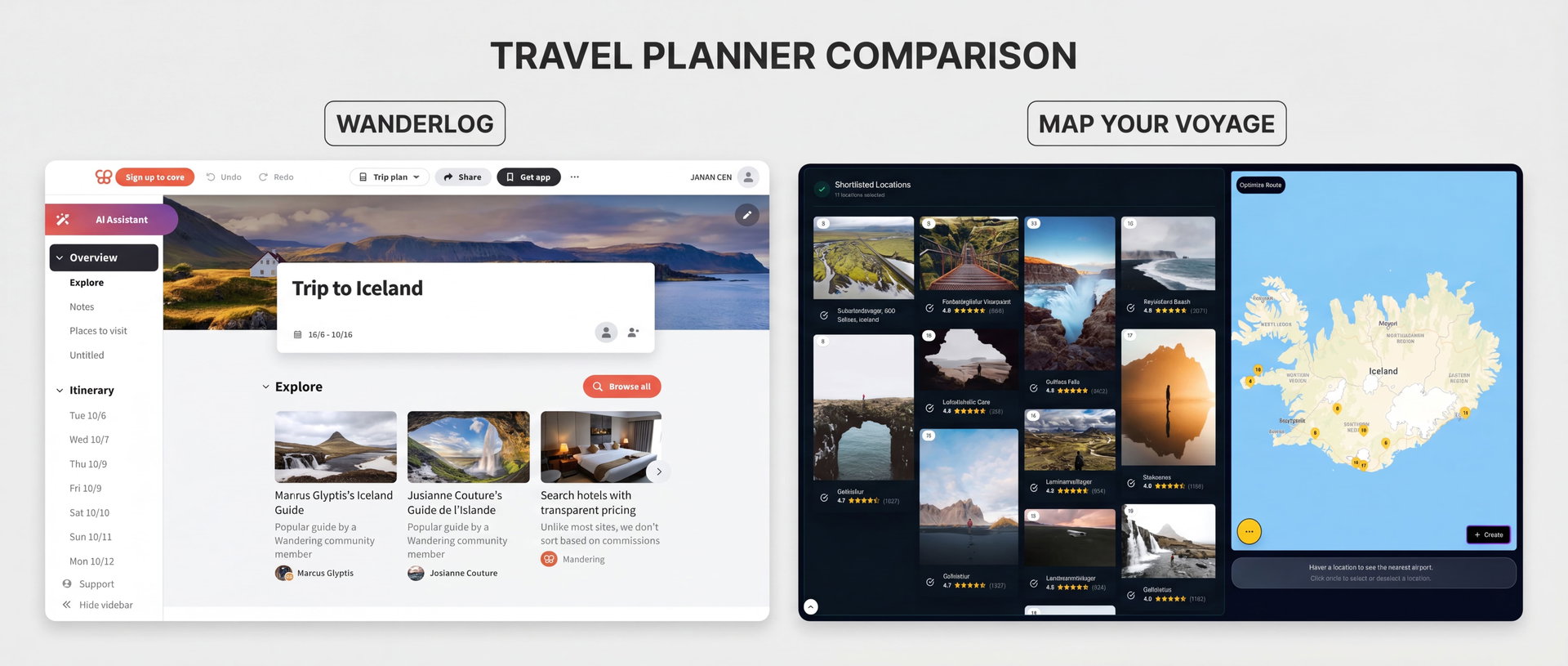
If you have started planning a trip in 2026, you have probably run into both of these names. Wanderlog is one of the most popular trip planners on the App Store and Play Store, loved for group trips and road trips. Map Your Voyage takes a different angle: it turns the Instagram reels that inspired you into a real, mapped, day-by-day itinerary.
On the surface they overlap — both put your trip on a map and build a day-by-day plan. But they start from opposite ends. Wanderlog is an organizer: it is brilliant at collecting places, bookings and people into one tidy itinerary. Map Your Voyage is a discovery-to-itinerary tool: it is built around watching real travel content and trusting that what you saw is exactly where the map sends you. This guide compares both honestly so you can pick the one that fits how you actually plan.
Already know where you want to go? Skip the reading and turn the reels you love into a mapped, day-by-day itinerary — unlimited locations, free.
Try the travel itinerary planner →The Short Version
| Wanderlog | Map Your Voyage | |
|---|---|---|
| Core idea | All-in-one trip planner & organizer | Plan from real Instagram reels with verified locations |
| How you discover | Place cards, web travel guides & community lists | Watch real reels, videos and photos, then shortlist |
| Discovery format | Static photos & info cards (ratings, hours, reviews) | Watchable video reels you can see before you commit |
| Accuracy | Solid place data; AI & crawled guides can include outdated spots | You watch the place on video first; pins are human-verified |
| Itinerary | Day-by-day plan, route-optimized | Day-by-day and hour-by-hour from your shortlisted spots |
| Group travel | Excellent — shared boards, voting, expense splitting | Solo-first discovery and curation |
| Booking | Imports your bookings; surfaces links & deals | Optional human concierge with a price-match guarantee |
| Pricing | Generous free tier; Pro ~$39.99/yr for power features | Free to build unlimited itineraries; pay only to book a custom trip |
| Apps | Polished iOS & Android apps; offline on Pro | Web app that works in any mobile browser |
| Best for | Group trips, road trips & organizing bookings | Instagram-inspired travelers who want to actually go there |
Features and pricing reflect publicly available information at the time of writing (June 2026) and can change; check each provider for current details.
What Is Wanderlog?
Wanderlog is one of the most popular all-round travel planners, and it has earned that reputation. It is essentially a command center for a trip: you create a trip, add the places you want to visit, and Wanderlog lays them out on a map with a day-by-day itinerary beside it. It is especially strong for group travel and road trips, and it has well-rated iOS and Android apps that work offline on the paid plan.
Its standout features include:
- Itinerary + map in one view. Add unlimited places and see them pinned on a map next to a structured, day-by-day plan.
- Real-time collaboration. Invite travel companions to edit the same trip together, vote on activities, and keep everyone literally on the same page.
- Travel guides & recommendations. Browse crawled web guides, community itineraries and place recommendations, then add anything to your trip with one click.
- Budgeting & expense splitting. Track trip costs and split shared expenses with the group — handy for friends traveling together.
- Booking organization. Import flight, hotel and car details (with automatic Gmail scanning of confirmations on Pro) so reservations live inside your itinerary.
- Route optimization. Reorder a day's stops into an efficient driving route — genuinely useful for road trips.
- AI assistant. A ChatGPT-powered chat that suggests places and answers trip questions, with deeper help part of Pro.
Wanderlog is genuinely excellent at what it does. If your trip involves several people, a rental car, and a pile of bookings to keep straight, it removes a huge amount of admin and chaos. The free tier is generous, and the apps are mature and polished.
The trade-off: discovery in Wanderlog is mostly text and static photos. You read a place card — a description, a rating, a couple of pictures, some “mentions” from travel blogs — and decide from that. That is fine for places you already know you want, but it does less to capture the feeling that made you want to go somewhere in the first place. And recommendations pulled from crawled guides or an AI chat can occasionally point you to a spot that has changed or closed, so the stops that matter are worth a quick double-check.
What Is Map Your Voyage?
Map Your Voyage starts from the moment of inspiration itself. Instead of reading a card that describes a place, you watch it — through curated Instagram travel reels, videos and photos from real creators — and then plan from the spots you actually liked.
Here's how a typical session works:
- Open a country page under Destinations or jump straight into the Travel Itinerary Planner and watch curated reels of that destination's top spots.
- When a reel makes you think “I want to go there,” tap the circle icon below it to shortlist that location.
- Every shortlisted place drops onto an interactive map with a human-verified geolocation, so you know exactly where it is — not an algorithm's best guess.
- Switch countries from a dropdown and keep adding, building a single list across multiple destinations in one session.
- Hit create, and Map Your Voyage generates a day-by-day and hour-by-hour itinerary that routes you efficiently through everything you picked — which you can refine by drag and drop.
There's also a Travel Inspiration feed for endless scrolling and bucket-list building, and you can even DM Instagram links to save reels into country-specific bucket lists automatically (more on that in our guide to planning trips from Instagram). When you would rather someone else handle the logistics, the Book a Custom Trip service has a human team arrange hotels, flights and activities for you. Discovering places and building itineraries is free and unlimited — there is no per-trip cap and no “upgrade to keep planning” wall.
How You Discover Places (Reels vs Place Cards)
This is the single biggest difference between the two, so it deserves its own section.
Wanderlog surfaces places as information: a photo or two, an average rating, opening hours, and “mentions” gathered from travel blogs, Google and TripAdvisor, plus suggestions from its ChatGPT-powered assistant. It is data-rich and fast, and for places you already plan to visit it is all you need. But a still photo and a 4.5-star rating flatten what a place actually feels like — and a lot of the magic of travel is in that feeling.
Map Your Voyage shows you a real video of the place before it ever lands in your plan. You are not reading that a viewpoint is “stunning” — you are watching footage of it, the same reel that would have made you stop scrolling on Instagram. That is a fundamentally more engaging way to decide where to go, and it is closer to how people actually catch wanderlust in 2026. Because each location's pin is human-verified rather than auto-extracted, the spot on the map is the spot in the reel — which matters if you have ever been sent to the wrong place by a vaguely tagged post.
Put simply: Wanderlog is excellent once you know what you want to add; Map Your Voyage is built for the part before that — falling in love with a place by watching it, then trusting that it is exactly where the map says.
Building the Itinerary
Both tools produce a structured, day-by-day itinerary, and both let you adjust it freely.
Wanderlog gives you a clean day-by-day plan with the map alongside, and can optimize the order of a day's stops to cut travel time. It is especially well suited to a single continuous route — a road trip where you are driving from stop to stop — and to keeping notes, reservations and checklists attached to each day.
Map Your Voyage assembles the itinerary from places you already chose because you saw and liked them, and goes a level deeper than most planners: it breaks the trip down hour-by-hour, not just day-by-day, and sequences stops to minimize backtracking. You can still drag activities between days or add new locations afterward, and open the real Google Maps route for each day when you are ready to move. Because every stop started as something you watched, the finished plan feels less like a generated draft and more like a trip you curated yourself.
Maps, Multi-Country & Accuracy
Both put your trip on an interactive map, and both are genuinely useful for spotting when a plan zigzags across a city. Two differences are worth calling out.
Multi-country trips. Wanderlog is organized around a trip and its route, which is ideal for one destination or a single road trip. Map Your Voyage is built to span several countries in one session: shortlist spots in one country, switch countries from a dropdown, keep adding, and watch them all collect on a single map before you build one combined itinerary. If your trip is “three weeks across Southeast Asia” rather than “a week in one place,” that design difference matters. (We go deeper on this in our guide to the best apps to plot locations and optimize routes.)
What sits behind each pin. In Wanderlog a pin is a place you added from a card or a guide; in Map Your Voyage a pin is a place you watched in a reel, with a location a human confirmed. Same map, different confidence level — particularly for hidden-gem spots that are notoriously mis-tagged online.
Group Travel & Collaboration
This is where Wanderlog clearly leads, and it would be dishonest to pretend otherwise. Wanderlog is built for planning with other people: several travelers can edit the same trip in real time, vote on which activities make the cut, leave comments, split shared expenses, and import everyone's bookings into one master itinerary. For a family reunion, a friends' road trip, or any trip where decisions are made by committee, that collaborative layer is excellent and hard to beat.
Map Your Voyage is, by design, more of a solo-first discovery and curation tool. Its strength is helping one person turn scattered Instagram inspiration into a verified, mapped plan — not real-time group voting. Many travelers happily use both: gather and verify the places you love on Map Your Voyage, then, if you are traveling as a group that wants to co-edit and split costs, manage the logistics in a collaborative organizer.
From Plan to Actually Booking
A plan is only useful if you can act on it.
Wanderlog keeps your bookings organized: it imports flight, hotel and car confirmations (automatically scanning Gmail on Pro), surfaces reservation links and deals, and stitches everything into one timeline. You still do the booking yourself across the usual sites, but Wanderlog makes sure nothing gets lost. Once you have a plan in Map Your Voyage, you can jump from any stop to nearby hotels on Booking.com, Airbnb, Expedia or Vrbo — the booking site opens with its map already centered on that exact location — plus nearby transport, restaurants and essentials.
Map Your Voyage also offers something an organizer does not: a custom trip service where a human team assembles the entire trip for you — hotels, flights and activities — based on your itinerary. It comes with a price-match guarantee (the promise that prices will be lower than booking online yourself), a free quote delivered within 24 hours, and no account required to request one. If you would rather not stitch together ten tabs of booking sites, that concierge layer is something a self-service planner does not provide.
Pricing: Free Tiers & Wanderlog Pro
Wanderlog has a genuinely generous free tier — unlimited places, the combined map-and-itinerary view, real-time collaboration and place recommendations all cost nothing. Wanderlog Pro runs about $39.99 per year and unlocks the power features: offline access, an expanded AI assistant, route optimization, automatic Gmail import of booking confirmations, export options (PDF / Google Maps), unlimited attachments, dark mode and an ad-free experience. For frequent travelers, Pro is fair value; for an occasional trip, the free tier is often enough.
Map Your Voyage is free for the whole planning experience — browsing reels, building unlimited bucket lists, and generating unlimited day-by-day, hour-by-hour itineraries cost nothing, with no AI message caps and no feature paywall on core planning. You only pay when you choose to book a custom trip, and that price comes with the price-match guarantee. There is no subscription required just to plan.
Pricing and plan limits change over time, so always check each provider's current pricing page before deciding.
Who Should Use Which?
Choose Wanderlog if…
- You're planning with other people and want real-time collaboration, voting and expense splitting.
- You're doing a road trip and want driving-route optimization for a single continuous route.
- You want one tidy place to organize bookings, notes and reservations, with automatic Gmail import.
- You want polished native iOS and Android apps with offline access on the go.
Choose Map Your Voyage if…
- Your wanderlust comes from Instagram, and you want to plan from the exact reels that inspired you.
- You want to watch a place on video before trusting it — not read a static place card.
- Accuracy matters: human-verified geolocations mean the pin is the place.
- Your trip spans multiple countries and you want them all on one map in one session.
- You want a detailed hour-by-hour itinerary, not just a day plan.
- You'd like the option of a human concierge to book the whole trip with a price-match guarantee.
- You want to plan unlimited trips for free, with no per-trip caps.
Ready to turn the reels you already love into a real, mapped, hour-by-hour trip?
Build my itinerary →The Verdict
If your trip is a group effort or a road trip and your main challenge is keeping people, places and bookings organized, Wanderlog is one of the best tools out there — mature, collaborative, and free to start.
If you're the kind of traveler who saves reels of turquoise coves and hidden alley cafés and thinks “I want to go there,” Map Your Voyage is built for exactly that instinct. It turns the content that inspired you into a verified, mapped, hour-by-hour trip across as many countries as you like — and optionally books it for you. There is no risk of being sent to a place that doesn't look like its photo, because you watched it first.
Plenty of travelers will use both: discover and verify the places you love on Map Your Voyage, then, if you need group collaboration or road -trip routing, organize the logistics in Wanderlog. But if you have to pick the tool that takes you from Instagram inspiration to a trip you can actually trust, that's where Map Your Voyage shines.
Frequently Asked Questions
What is the difference between Wanderlog and Map Your Voyage?
Wanderlog is an all-in-one trip planner and organizer where you build a day-by-day itinerary from place cards, web travel guides and a built-in map, with strong collaboration, budgeting and booking-import tools. Map Your Voyage lets you plan from real Instagram travel reels and posts with human-verified geolocations, so you watch a place on video before adding it to your map and a day-by-day, hour-by-hour itinerary.
Is Map Your Voyage a good Wanderlog alternative?
Yes — especially if your travel inspiration comes from Instagram and you value accuracy and multi-country trips. Instead of reading static place cards, Map Your Voyage builds your itinerary from spots you actually watched in real reels, each with a human-verified location, and offers an optional human concierge to book the whole trip with a price-match guarantee.
Is Wanderlog free, or do you need Wanderlog Pro?
Wanderlog has a genuinely generous free tier that covers unlimited places, a combined map and itinerary view, real-time collaboration and place recommendations. Wanderlog Pro costs about $39.99 per year and adds power features such as offline access, expanded AI help, route optimization, automatic Gmail import of booking confirmations, export options and dark mode. Pricing can change, so check Wanderlog's site for current details.
Is Map Your Voyage free?
Yes. Map Your Voyage is free to discover places, build unlimited bucket lists and generate unlimited day-by-day, hour-by-hour itineraries. You only pay if you choose to book a fully customized trip through its concierge service, which comes with a price-match guarantee and a free quote within 24 hours.
Which is better for group trips, Wanderlog or Map Your Voyage?
Wanderlog is the stronger pick for collaborative group and road trips: multiple people can edit the same trip in real time, vote on activities, split expenses and import everyone's bookings. Map Your Voyage is built around individual discovery from Instagram reels and verified locations, so it shines when you want to curate and map a trip yourself rather than co-edit with a group.
What is the best Wanderlog alternative for planning a trip from Instagram?
Map Your Voyage is the closest alternative for travelers inspired by Instagram. You shortlist places from curated, human-verified Instagram reels, every spot lands on an interactive map, and one click turns your shortlist into a day-by-day, hour-by-hour itinerary across as many countries as you like. You can even DM a reel to its Instagram account and it saves the locations to a country-specific bucket list automatically.
Can Wanderlog or Map Your Voyage book your trip for you?
Wanderlog helps you organize bookings you make yourself, importing flight, hotel and car confirmations into one itinerary and surfacing booking links and deals. Map Your Voyage goes a step further with an optional human concierge that assembles and books the whole trip — hotels, flights and activities — with a price-match guarantee, if you would rather not book it yourself.
Sources & further reading
- Wanderlog official website — product features and overview.
- Wanderlog Pro — free vs Pro features and pricing.
- Wanderlog on the App Store — mobile app and ratings.
- Best apps to build customized travel itineraries — our wider roundup of trip planners.
- Mindtrip vs Map Your Voyage — how an AI-first planner compares.
Product details reflect publicly available information at the time of writing (June 2026) and may change.